Kitten Keyboard Escape How to Play
The complete keyboard obby session loop explained.
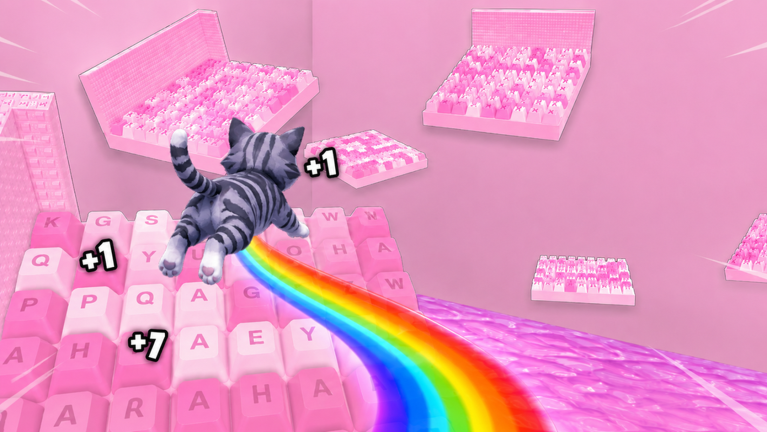
+1 Kitten Keyboard Escape looks like a cozy kitten romp across candy-colored keyboard keys, but underneath is a structured incremental obby: clear stages, grow jump power, buy multipliers, and accept that one mistake can rewind several keys. This guide explains the full gameplay loop so sessions feel purposeful whether you play solo or race friends online.
Core loop in one paragraph
Spawn on keyboard platforms, jump across keycaps, reach segment ends to earn currency and stronger jumps, spend currency on upgrades, push into harder layouts, optionally reset or rebirth for long-term multipliers, and repeat during normal weeks or boosted 3X weekends. ASMR-style presentation and flips reward patience; rushing causes fall-backs that erase minutes of progress.
Starting a session
- Launch the official Roblox place from Official Links.
- Check HUD banners for weekend 3X or event text.
- Redeem any new promo codes via Redeem Codes.
- Set a goal—currency amount, stage milestone, or co-op race—with Session Planner.
Skipping setup turns twenty-minute boosts into menu wandering.
Movement and jump growth
Your kitten uses standard Roblox locomotion. Jump strength increases as you progress through the experience’s incremental systems. Early gaps require careful timing; later gaps expect you to have bought upgrades from Upgrades Tier List.
Jump growth is the main gate—not player level in an RPG sense. When a gap feels impossible, you likely need more jump power from clears or shop buys, not a secret shortcut. Read Jump Power for scaling detail.
Stages and fall penalties
Keyboard stages chain obstacles themed around keys, spacebars, and peripheral motifs. Clearing a segment advances your position and rewards you. Missing a jump often sends you backward to an earlier key cluster.
Fall penalties are a feature, not a bug. They encourage learning layouts on Stage Walkthrough instead of brute-forcing with scripts—see Script Safety for why exploits backfire.
Currency and the shop
Currency accrues from successful clears, events, codes, and group gifts. The shop sells jump upgrades, multiplier unlocks, and cosmetics. Economic purchases should follow Early Game Build early and Upgrades Tier List later.
Cosmetics match the candy ASMR vibe but do not change obstacle math. Buy flair after functional upgrades unless you are purely social.
Multipliers and rebirth layers
Temporary multipliers include weekend 3X events on Weekend Multiplier. Permanent layers appear through progression systems detailed in Multipliers & Rebirth.
Play normal weeks to learn routes; play weekends to convert known routes into faster gains.
Co-op and racing friends
Online co-op lets friends share a server and race parallel progress. You still fall individually. Coordinate using Racing Tips—wait at hard keys, call out jump upgrades, and avoid blocking narrow cap edges.
Mobile players in mixed groups should pre-read Mobile Tips so touch jumps keep pace.
Difficulty spikes
When progress stalls, switch guides instead of quitting:
- Mechanical plateaus → Jump Power
- Brutal layouts → Beat Hard Stages
- Bad spending → Upgrades Tier List
- Control issues → Controls
Ending a session cleanly
Note your stage position and currency on Progress Checklist. Log off at checkpoints mentally—mid-key stops increase repeat work next login.
Long-term progression mindset
Keyboard obbies reward consistency over single marathon days. Short focused sessions beat tired jumping that triggers fall chains. Schedule 3X weekends with Weekend Events and update knowledge after Latest Update patches.
Solo versus co-op session goals
| Goal type | Solo focus | Co-op focus |
|---|---|---|
| Currency | Farm known routes | Share upgrade timing |
| Jump power | Shop between clear blocks | Match lowest friend’s tier |
| Hard keys | Practice alone first | Race only after solo clears |
| Weekend 3X | Maximize reliable loops | Schedule race nights around farms |
Use Racing Tips when friends join; return to solo push blocks when jump gaps widen.
Pitfalls that feel like bugs
- Buying cosmetics before jump tiers stalls later worlds.
- Ignoring the Kitten Obby Fan Club group gift wastes free currency.
- Treating every fall as lag instead of layout learning.
- Playing a clone place that looks similar—verify place ID 94860588848140 on Official Links.
Related starting point
Brand-new accounts should still begin with Getting Started before this page for account setup and group gifts.
Frequently Asked Questions
Quick answers about Kitten Keyboard Escape on Roblox.
Can you pause progress in Kitten Keyboard Escape?
Roblox saves progression between sessions, but stopping mid-difficult key section may mean repeating jumps when you return.
Is co-op required?
No. Solo play is fully supported. Co-op adds racing fun but is optional.
What happens when I fall?
Many sections send your kitten back to earlier keyboard platforms. Exact distance varies by layout severity.